A company chart is a visual representation of how a business is organized. It shows job roles, departments, reporting relationships, and levels of responsibility so employees and stakeholders can quickly understand who reports to whom and how different parts of the organization work together.
Whether a company has a few employees or several departments, a clear organizational structure can improve communication, clarify responsibilities, and support better decision-making. A company chart can also help managers identify gaps, understand reporting lines, and plan resources as the business grows.
What Is a Company Chart?
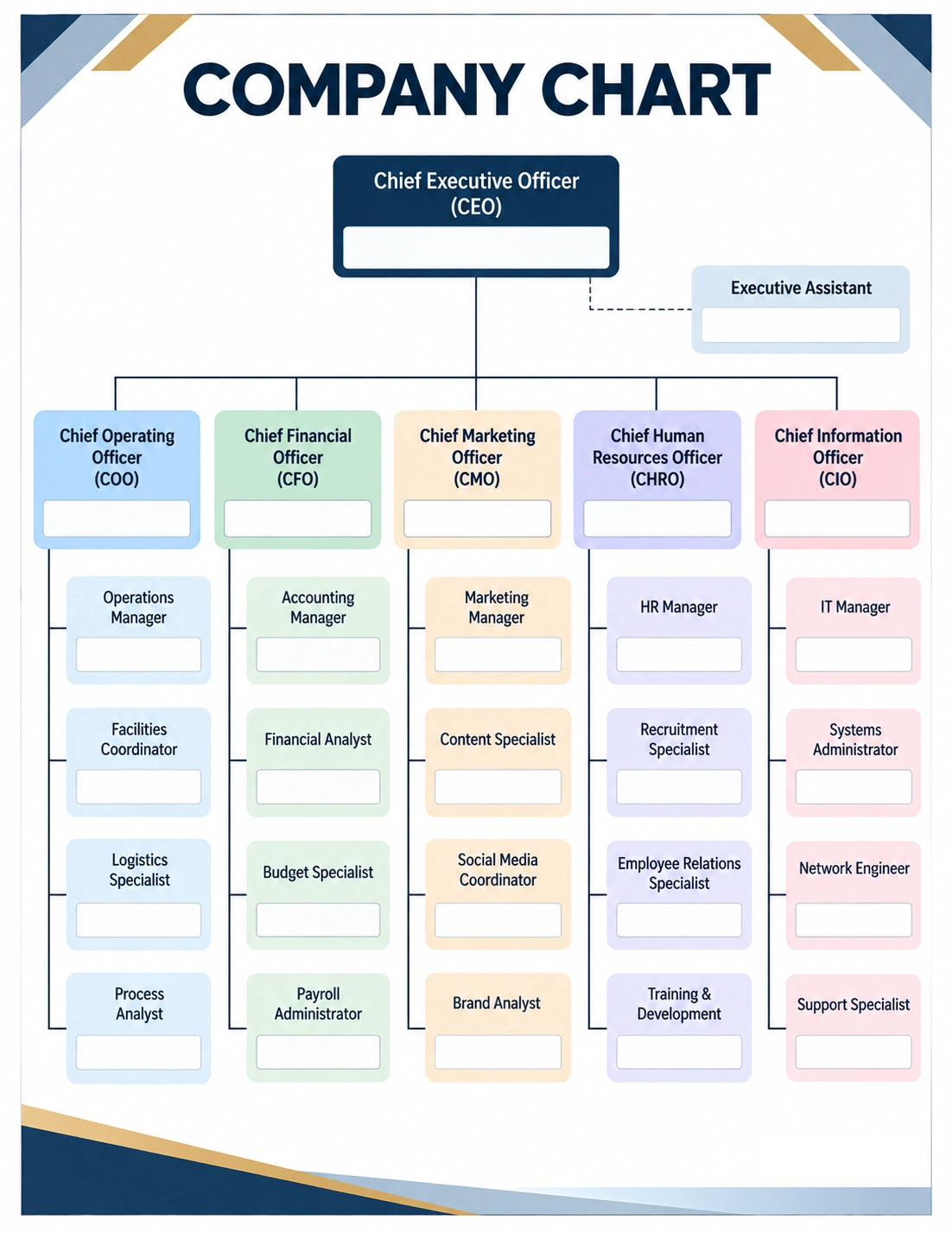
A company chart is a visual diagram that explains the structure of an organization. It typically displays positions or departments in connected boxes, with lines showing reporting relationships and organizational levels.
For example, a company chart may place the Chief Executive Officer at the top, followed by department leaders such as the Chief Financial Officer, Chief Marketing Officer, or Chief Operating Officer. Managers and other employees can then be positioned below the appropriate department.
The exact structure depends on the company’s size, industry, management style, and business objectives.
Why Is a Company Chart Important?
A well-designed organizational chart provides employees with a simple visual roadmap of the business. Instead of relying on assumptions or lengthy descriptions, employees can use the chart to understand responsibilities and reporting relationships.
- Clarifies reporting lines: Employees can see who they report to and who manages different functions.
- Defines responsibilities: Departments and positions can be clearly identified.
- Improves communication: Employees can better understand where to direct questions or requests.
- Supports decision-making: Clear authority levels can make organizational decisions easier to understand.
- Helps with resource planning: Managers can identify staffing needs and organizational gaps.
- Supports onboarding: New employees can quickly learn how the company is structured.
- Improves transparency: A visible structure gives employees a clearer understanding of the organization.
What Should a Company Chart Include?
The information included in a company chart depends on its purpose. A simple chart may show only departments and managers, while a detailed organizational chart may include individual positions and reporting relationships.
Company Leadership
Many organizational charts begin with the company’s highest leadership position, such as the CEO, president, managing director, or owner. This establishes the highest level of authority represented in the chart.
Departments
Major departments can be displayed beneath the leadership level. Common examples include operations, finance, marketing, human resources, information technology, sales, customer service, and administration.
Job Positions
Individual positions can be added beneath each department. Depending on the organization’s needs, the chart may show managers, supervisors, specialists, coordinators, assistants, and other roles.
Reporting Relationships
Connecting lines are one of the most important elements of an organizational chart. They show the relationship between positions and help employees understand the chain of command.
Employee Names
Some companies include employee names in addition to job titles. Names can make the chart more practical for day-to-day use, particularly in smaller organizations or teams.
Common Types of Company Charts
There is no single organizational chart format that works for every company. Different structures can be used depending on how authority, departments, and teams are organized.
Hierarchical Company Chart
A hierarchical chart places leadership at the top and progressively lower levels beneath it. This is one of the most familiar organizational structures.
It works well for organizations with clearly defined levels of management and traditional reporting relationships.
Functional Organizational Chart
A functional structure groups employees according to their areas of expertise. For example, finance employees may report through the finance department while marketing employees report through marketing leadership.
This approach can make departmental responsibilities particularly easy to understand.
Divisional Organizational Chart
A divisional structure organizes employees around products, markets, geographic regions, or business units. Each division may have its own management and supporting functions.
Matrix Organizational Chart
A matrix structure can show employees working across multiple teams or reporting relationships. It is often used when employees contribute to projects while also remaining part of a functional department.
Flat Organizational Chart
A flat company structure has fewer management levels between employees and senior leadership. This format can be useful for smaller businesses or organizations that emphasize collaboration and decentralized decision-making.
How to Create a Company Chart
Creating a company chart becomes easier when the organization’s structure is reviewed systematically. The goal is to create a chart that accurately reflects how the business operates.
1. Identify the Highest Leadership Position
Begin by identifying the highest position represented in the organization. This may be the owner, CEO, president, or another senior executive.
2. List Major Departments
Identify the major functions of the company. Consider which departments are essential to the organization’s operations and how they relate to leadership.
3. Add Managers and Supervisors
Place managers and supervisors under the appropriate leadership or department. Make sure the reporting relationships accurately reflect the company’s actual structure.
4. Add Other Positions
Continue adding relevant positions beneath each management level. Avoid adding unnecessary detail if the chart becomes difficult to read.
5. Connect Reporting Relationships
Use clear lines to show who reports to whom. Consistent connectors make the organizational structure easier to understand.
6. Review the Chart
Ask department leaders or managers to review the chart before distributing it. They can help identify incorrect reporting relationships, missing positions, or outdated information.
How to Make a Company Chart Easy to Understand
A company chart should communicate information quickly. Good visual organization is therefore just as important as accurate information.
- Use consistent box sizes for similar positions.
- Keep reporting lines simple and easy to follow.
- Group related departments together.
- Use clear job titles.
- Avoid excessive text inside each box.
- Maintain consistent spacing between levels.
- Use color carefully to distinguish departments when helpful.
- Keep the overall design clean and professional.
A printable company chart template can provide a useful starting point because the basic structure is already organized. You can then customize the positions, departments, names, and reporting relationships to match your organization.
Company Chart for Small Businesses
Small businesses do not necessarily need complicated organizational charts. A simple chart can show the owner or business leader at the top, followed by key departments or employees.
For example, a small company might have an owner overseeing operations, sales, finance, and customer service. Each function can then show the employee or manager responsible for that area.
As the company grows, the chart can be expanded to include new management levels and specialized departments.
Company Chart for Large Organizations
Large organizations often require more detailed organizational structures. Trying to place every employee on a single page can make the chart difficult to read.
In this situation, companies may create an overall organizational chart and separate departmental charts. The company-wide version provides a high-level overview, while individual department charts provide more detailed information about specific teams.
Benefits of Using a Company Chart Template
A company chart template can save time when creating or updating an organizational structure. Instead of designing the layout from scratch, you can begin with an established framework and customize it for your organization.
- Provides a consistent visual structure
- Makes organizational information easier to arrange
- Reduces design work
- Helps standardize company documentation
- Can be customized for different departments
- Can be printed or shared digitally
- Makes organizational updates easier to manage
When Should a Company Chart Be Updated?
An organizational chart should be reviewed whenever there are meaningful changes to the company’s structure. Keeping an outdated chart can create confusion about responsibilities and reporting relationships.
Common reasons for updating a company chart include:
- Hiring new managers or executives
- Creating a new department
- Removing or combining departments
- Changing reporting relationships
- Promoting employees
- Reorganizing teams
- Expanding into a new location
- Changing the company’s management structure
Even when no major changes occur, periodic reviews can help ensure that the chart continues to reflect the company’s actual structure.
Common Company Chart Mistakes
An organizational chart is only useful when it accurately represents the organization. Several common mistakes can reduce its effectiveness.
- Outdated information: Old job titles or former employees can make the chart misleading.
- Unclear reporting lines: Poorly connected boxes can make responsibilities difficult to understand.
- Too much information: Including every detail can make the chart visually overwhelming.
- Inconsistent job titles: Different terminology can create unnecessary confusion.
- Incorrect hierarchy: Positions should be placed according to the actual organizational structure.
- Poor spacing: Crowded elements can make the chart difficult to follow.
Company Chart vs. Organizational Chart
The terms company chart and organizational chart are often used to describe the same type of visual document. Both can show the structure of a business, including departments, positions, management levels, and reporting relationships.
“Organizational chart” is the more common formal term, while “company chart” is often used when referring specifically to a business organization. The appropriate terminology can vary depending on the company and context.
Frequently Asked Questions About Company Charts
What is a company chart?
A company chart is a visual representation of a company’s organizational structure. It can show leadership positions, departments, job roles, and reporting relationships.
What is the purpose of a company chart?
The main purpose is to help employees and stakeholders understand how the company is organized, who is responsible for different functions, and how reporting relationships work.
What should be included in a company chart?
A company chart may include leadership positions, departments, job titles, employee names, and reporting relationships. The amount of detail should depend on the purpose and size of the organization.
Is a company chart the same as an organizational chart?
In most contexts, yes. Both terms can refer to a diagram that illustrates the structure of an organization and its reporting relationships.
How often should a company chart be updated?
A company chart should be updated whenever important organizational changes occur, such as new hires, promotions, reorganizations, department changes, or new reporting relationships.
Can a small business use a company chart?
Yes. A simple organizational chart can be particularly useful for small businesses because it clarifies responsibilities and helps employees understand who handles different business functions.
Can a company chart include employee names?
Yes. Employee names can be included when useful. Some organizations use names alongside job titles to make the chart easier to use for internal communication.
What is the best format for a company chart?
The best format depends on the organization’s structure. A hierarchical, functional, divisional, matrix, or flat structure may be appropriate depending on how the company operates.
Conclusion
A company chart provides a clear visual roadmap of how a business is organized. By showing leadership, departments, job roles, and reporting relationships, it can improve communication, clarify responsibilities, support resource planning, and make organizational changes easier to understand.
The most effective company charts are accurate, simple, easy to read, and regularly updated. Whether you manage a small business or a large organization, a well-structured organizational chart can provide employees and stakeholders with a practical overview of how the company works.
Download: Company Chart Template
