A commission sheet is a practical tool for tracking sales activity, calculating sales commissions, and keeping compensation records organized. It helps businesses record sales amounts, commission rates, earned commissions, and other important details in one place.
For sales teams, an accurate commission sheet can make compensation easier to understand and manage. Sales representatives can see how their earnings are calculated, while managers and payroll teams can use the same information to review performance and prepare commission payments.
Whether you manage a small sales team or a larger organization, a well-designed commission tracking sheet can reduce calculation errors, improve transparency, and make sales compensation easier to monitor.
What Is a Commission Sheet?
A commission sheet is a document used to record sales transactions and calculate the commission earned from those sales. It typically includes information such as the salesperson’s name, sales date, customer, product or service, sales amount, commission rate, and commission amount.
A commission sheet can be created as a printable worksheet, spreadsheet, or digital document. The format can be customized according to the company’s compensation plan.
A basic commission tracking sheet may include:
- Employee or salesperson name
- Employee ID
- Sales date
- Customer or client
- Product or service sold
- Sales amount
- Commission rate
- Commission earned
- Payment or commission period
- Additional notes
The exact information depends on how commissions are calculated and how the organization manages sales compensation.
Commission Sheet Template
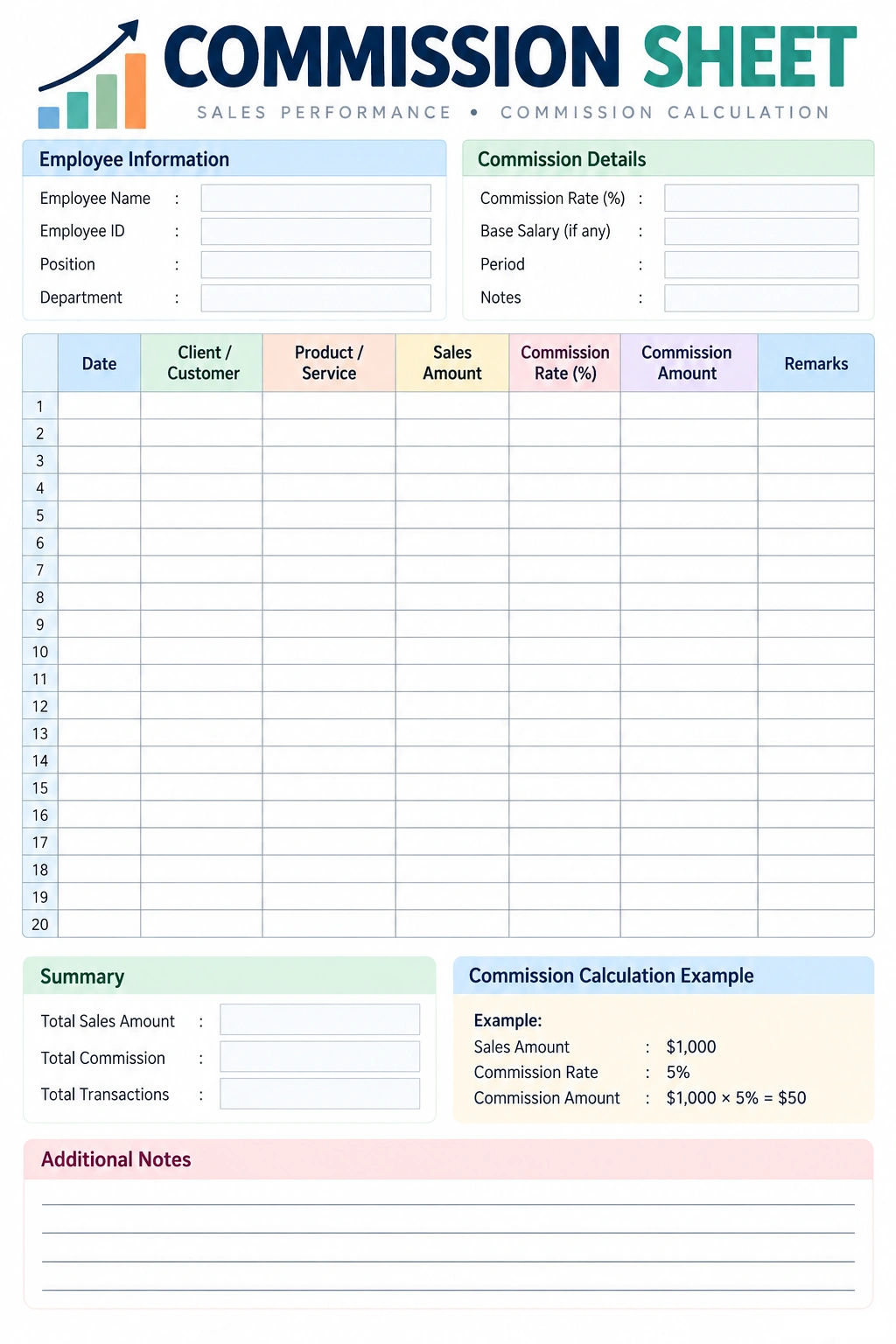
A printable commission sheet template provides a structured way to record sales and calculate commissions. It can be used for individual sales representatives, teams, departments, or specific commission periods.
The template below includes employee information, commission details, a sales transaction table, a summary section, and a commission calculation example. You can print it and fill it out manually or use its structure as a starting point for a digital commission tracker.
Why Use a Commission Sheet?
A commission sheet helps organize sales compensation information and provides a clear record of how commissions are calculated. This can be especially useful when sales teams handle multiple customers, products, or commission rates.
Track Sales Performance
Recording sales transactions makes it easier to monitor sales activity during a specific period. Managers can review total sales, transaction counts, and commission amounts without relying on scattered notes or separate records.
Calculate Commissions Accurately
A structured commission sheet provides a consistent place to record the sales amount and applicable commission rate. This can reduce the risk of overlooking transactions or using the wrong rate.
Improve Transparency
Sales representatives often want to understand how their commission earnings were calculated. A detailed record allows both the employee and employer to review the underlying sales information.
Support Payroll Processing
When commission records are organized by employee and payment period, payroll or accounting teams can review the information more efficiently before commissions are paid.
Compare Sales Goals and Results
Commission records can also provide useful information for reviewing sales performance against established targets, quotas, or incentive plans.
What Should Be Included in a Commission Sheet?
The best commission sheet includes the information necessary to calculate and verify sales compensation. The exact fields should match the organization’s commission policy.
Employee Information
Include the salesperson’s name, employee ID, department, position, or other identifier. This helps ensure that sales transactions are assigned to the correct person.
Commission Period
Clearly identify the period covered by the sheet, such as a week, month, quarter, or other payment cycle. This makes it easier to organize commission records and compare different periods.
Sales Date
Record the date associated with each qualifying sale. The relevant date may depend on the company’s commission policy, such as the order date, invoice date, payment date, or another defined event.
Customer or Client
Recording the customer or client can make individual transactions easier to identify and verify.
Product or Service
Include the product or service sold when different products have different commission rates or sales rules.
Sales Amount
The sales amount is usually the basis for calculating a percentage-based commission. However, some commission plans use other measures, such as gross profit, collected revenue, units sold, or a fixed amount per transaction.
Commission Rate
The commission rate specifies the percentage or amount used to calculate the salesperson’s commission. A company may use a single rate or different rates based on products, sales volume, customer type, or performance levels.
Commission Amount
The commission amount is the resulting compensation associated with a qualifying transaction or group of transactions.
How to Calculate Sales Commission
A basic percentage-based commission calculation is straightforward. Multiply the qualifying sales amount by the applicable commission rate.
Commission = Qualifying Sales Amount × Commission Rate
For example, if a salesperson generates $10,000 in qualifying sales and the commission rate is 5%, the commission calculation is:
$10,000 × 5% = $500
The salesperson would earn $500 under this simplified example.
Actual commission calculations may be more complicated. A company’s compensation plan may include sales thresholds, tiered rates, bonuses, deductions, returns, cancellations, discounts, or different rules for different products.
Common Types of Commission Structures
Commission sheets can be adapted to different sales compensation models. Understanding the structure is important because the calculation method determines what information needs to be recorded.
Flat-Rate Commission
With a flat-rate commission, the salesperson earns the same percentage on qualifying sales. For example, every qualifying sale may generate a 5% commission.
Tiered Commission
A tiered commission structure changes the rate when a salesperson reaches specific sales thresholds. For example, different portions of sales may qualify for different rates depending on the compensation plan.
Fixed Commission Per Sale
Some organizations pay a fixed amount for each qualifying transaction instead of a percentage of the sale. A commission sheet can track the number of qualifying sales and the applicable fixed amount.
Gross Profit Commission
In some compensation plans, commission is based on gross profit rather than total revenue. In this situation, the sheet may need additional fields for sales revenue, costs, gross profit, and the applicable commission rate.
Bonus and Commission Combination
A sales compensation plan may combine commissions with bonuses for reaching specific targets. A commission tracker can include separate columns for regular commission, bonuses, adjustments, and total compensation.
How to Use a Commission Sheet
A consistent process makes commission tracking easier and reduces the possibility of missing information.
Step 1: Enter Employee Information
Start by entering the salesperson’s name, employee ID, department, and commission period. This identifies who the sheet belongs to and which period it covers.
Step 2: Record Each Qualifying Sale
Enter each qualifying transaction with its date, customer, product or service, and sales amount. Use the same format for every transaction.
Step 3: Apply the Correct Commission Rate
Check the applicable commission policy before entering the rate. If different products or sales levels have different rates, verify the rate for each transaction.
Step 4: Calculate the Commission
Calculate the commission based on the compensation plan. For percentage-based commissions, multiply the qualifying amount by the applicable rate.
Step 5: Review the Records
Before finalizing the commission payment, review the sales amounts, rates, calculations, returns, adjustments, and other relevant details.
Step 6: Record the Final Commission
Summarize the total sales and commission for the payment period. Keep the completed record according to the organization’s recordkeeping practices.
Commission Sheet for Sales Teams
A commission tracking sheet can be particularly useful for sales teams because multiple transactions may need to be reviewed before each commission payment.
For a sales team, consider organizing commission records by:
- Sales representative
- Sales territory
- Product category
- Customer type
- Commission period
- Sales target
- Commission rate
- Total qualifying sales
- Total commission earned
This structure can help managers identify sales trends while maintaining a clear record of compensation calculations.
Tips for Creating an Effective Commission Sheet
- Keep the layout simple and easy to scan.
- Use clearly labeled columns for sales and commission information.
- Separate sales data from summary calculations.
- Define which sales qualify for commission.
- Record the commission period clearly.
- Use consistent calculation methods.
- Document adjustments, returns, and cancellations.
- Review calculations before processing payments.
- Keep supporting sales records available for verification.
- Update the template when the commission policy changes.
Common Commission Tracking Mistakes to Avoid
Commission calculations can become difficult to manage when sales information is incomplete or inconsistent. A few simple controls can help prevent common problems.
Using the Wrong Commission Rate
When different products or sales levels have different rates, using an incorrect percentage can produce an inaccurate payment. Always verify the applicable rate against the current commission plan.
Missing Sales Transactions
A transaction that is not recorded can result in an incomplete commission calculation. Reconcile sales records with the commission sheet before finalizing a payment.
Ignoring Returns or Cancellations
If the commission policy adjusts compensation after a return or cancellation, those transactions should be documented clearly so the commission calculation can be reviewed.
Failing to Document Adjustments
Manual adjustments should include enough information to explain why the adjustment was made. This creates a clearer record for future review.
Not Defining the Commission Period
Every commission sheet should clearly identify the relevant payment period. This prevents transactions from being accidentally included in the wrong reporting cycle.
Commission Sheet vs. Commission Report
A commission sheet and a commission report can serve related but different purposes.
A commission sheet is often used to record individual sales and calculate commissions. It may contain transaction-level information for a specific employee or period.
A commission report typically summarizes commission information for management, payroll, accounting, or performance analysis. It may contain totals rather than detailed transaction records.
Organizations can use both documents together. Detailed commission sheets provide supporting records, while summary reports provide a broader view of sales compensation.
Frequently Asked Questions About Commission Sheets
What is a commission sheet used for?
A commission sheet is used to record sales transactions, apply commission rates, calculate earned commissions, and maintain a clear record of sales-based compensation.
How do you calculate commission on a commission sheet?
For a simple percentage-based commission, multiply the qualifying sales amount by the applicable commission rate. For example, $5,000 in qualifying sales at 4% produces a $200 commission.
What information should a sales commission sheet include?
A sales commission sheet can include the employee name, sales date, customer, product or service, sales amount, commission rate, commission amount, payment period, and notes or adjustments.
Can I use a commission sheet for multiple salespeople?
Yes. You can use separate sheets for each salesperson or create a larger commission tracker with an employee column. The best approach depends on the size of the sales team and how compensation records are managed.
Can a commission sheet include bonuses?
Yes. A commission sheet can include separate fields for bonuses, incentives, adjustments, or other compensation components when they are part of the organization’s sales compensation plan.
What is the difference between sales commission and bonus?
Sales commission is generally tied directly to qualifying sales or another defined sales performance measure. A bonus may be tied to broader targets, special achievements, or other conditions established by the compensation plan.
Should commission sheets be reviewed before payment?
Yes. Reviewing sales transactions, commission rates, calculations, adjustments, returns, and other applicable information before payment can help identify errors and improve the accuracy of commission records.
Conclusion
A commission sheet provides a practical way to organize sales transactions, calculate commissions, and maintain transparent compensation records. By recording the right information and applying consistent calculation methods, businesses can make commission tracking easier for sales representatives, managers, payroll teams, and accounting staff.
Whether you use a printable commission sheet template or a digital spreadsheet, keep the format simple, document the applicable commission rules, and review calculations before payments are finalized. A well-organized commission tracking system can support accurate payments while also providing useful information about sales performance.
Download: Commission Sheet Template
