When faced with complex information, it can be challenging to make sense of it all. That’s where T-charts come in handy.
T-charts are a simple yet powerful tool that visually organizes and compares two distinct aspects of a topic.
By creating two columns for comparison, such as pros and cons, facts vs. opinions, causes vs. effects, or similarities vs. differences, T-charts can simplify information and aid in decision-making, brainstorming, and understanding relationships between ideas.
What is a T-Chart?
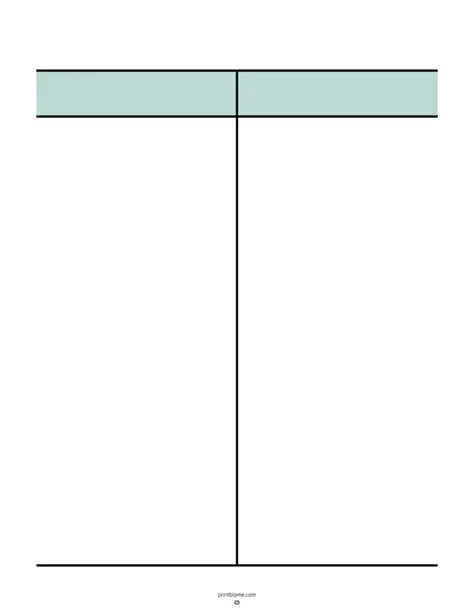
A T-chart is a graphic organizer that consists of two columns connected by a horizontal line, forming a T shape. The left column is used to list one aspect of the topic, while the right column is dedicated to the other aspect. This format allows for easy comparison and analysis of information.
T-charts are commonly used in educational settings to help students organize their thoughts and understand complex concepts.
Why Use T-Charts?
T-charts are a versatile tool that can be utilized in various situations to streamline information processing. Here are some reasons why T-charts are beneficial:
Clarity and Organization
One of the main reasons to use T-charts is to bring clarity and organization to complex information. By visually separating two aspects of a topic into different columns, T-charts make it easier to see the relationships between them. This organized structure helps users focus on key points and identify patterns that may not be immediately apparent when presented in a more traditional format.
Comparison and Analysis
T-charts excel at facilitating comparison and analysis of information. Whether you’re weighing the pros and cons of a decision, comparing different viewpoints, or evaluating cause-and-effect relationships, T-charts provide a systematic way to display contrasting information. This side-by-side comparison allows for a deeper understanding of the topic and can reveal insights that may have been overlooked otherwise.
Decision-Making and Problem-Solving
When faced with a complex issue or multiple options, T-charts can be instrumental in the decision-making process. By listing the advantages and disadvantages of each choice in separate columns, T-charts enable individuals or teams to evaluate the information objectively. This structured approach to decision-making can lead to more informed choices and help mitigate potential risks by considering all relevant factors.
Brainstorming and Idea Generation
T-charts are not only useful for analyzing existing information but also for generating new ideas. During brainstorming sessions, T-charts can help organize thoughts, categorize concepts, and spark creative thinking. By visually mapping out different aspects of a topic, individuals can explore various possibilities and connections, leading to innovative solutions and fresh perspectives.
Understanding Relationships
Another key benefit of T-charts is their ability to highlight the relationships between ideas. Whether you’re comparing facts and opinions, causes and effects, or similarities and differences, T-charts make it easier to see how different elements are interconnected. This visual representation can enhance comprehension and deepen your understanding of complex concepts by revealing the underlying connections between them.
What to Include in a T-Chart?
When creating a T-chart, it’s important to include the relevant information that you want to compare. Here are some tips on what to include in a T-chart:
Clear Headings
Start by labeling each column with clear headings that reflect the two aspects you are comparing. These headings should be concise yet descriptive, guiding the reader on what each column represents. By providing clear direction from the outset, you set the stage for a focused and structured comparison.
Specific Details
Under each aspect of the T-chart, include specific details, examples, or evidence that support the category. These specific details add depth to your comparison and provide context for the information being presented. Whether you’re listing arguments for and against a topic or outlining causes and effects, specificity is key to making a meaningful comparison.
Key Points
Highlight key points or distinctions between the two aspects in your T-chart. By emphasizing the most important information, you draw attention to the critical differences or similarities that define each category. This selective highlighting helps readers focus on essential details and grasp the significance of the comparison more effectively.
Organized Layout
Ensure that your T-chart is organized in a logical and easy-to-follow layout. The information in each column should be presented in a structured manner, with clear transitions between different points. Maintaining a consistent format throughout the chart enhances readability and comprehension, allowing users to navigate the content seamlessly.
How to Create a T-Chart
Creating a T-chart is a straightforward process that can be done on paper or using digital tools. Follow these steps to create your own T-chart:
Draw a T Shape
Begin by drawing a horizontal line across your page to represent the main topic or question you are analyzing. Then, draw two vertical lines extending downward from the horizontal line to create the T shape. This basic structure forms the foundation of your T-chart and provides a clear framework for organizing information.
Label the Columns
Label each column with distinct headings that correspond to the two aspects you want to compare. These headings should be clear and concise, reflecting the key categories of information you are exploring. By labeling the columns upfront, you establish a visual hierarchy that guides readers through the chart and sets expectations for what will be presented.
Fill in the Information
Once you’ve established the structure and headings of your T-chart, start filling in the information under each aspect. List relevant details, examples, or data points that illustrate the characteristics of each category. Be thorough in your descriptions to provide a comprehensive comparison that covers the key elements of the topic you’re analyzing.
Review and Refine
After completing your T-chart, take the time to review and refine the content. Check for accuracy, clarity, and consistency in your comparisons. Ensure that all important details are included and that the information flows logically from one point to the next. Making any necessary revisions will enhance the overall effectiveness of your T-chart.
Tips for Successful T-Charts
To make the most out of T-charts, consider the following tips for creating successful T-charts:
Focus on Key Points
When constructing a T-chart, focus on highlighting the key points or distinctions between the two aspects you are comparing. Prioritize essential information that is relevant to the topic at hand and avoid cluttering the chart with extraneous details. By maintaining a clear focus on key points, you ensure that your T-chart effectively conveys the most critical aspects of the comparison.
Use Visuals
Incorporate visuals such as icons, colors, or images to enhance the visual appeal of your T-chart. Visual elements can help differentiate between categories, emphasize important details, and make the information more engaging for the reader. By leveraging visuals effectively, you can create a T-chart that is not only informative but also visually stimulating and memorable.
Keep It Concise
Strive to keep your T-chart concise and to the point. Avoid unnecessary repetition or verbosity in your descriptions, focusing instead on presenting information succinctly and clearly. By communicating key points concisely, you help readers grasp the essence of the comparison quickly and efficiently. Concise T-charts are more likely to hold the reader’s attention and convey information effectively.
Practice Consistency
Maintain consistency in formatting, layout, and organization throughout your T-chart. Use a uniform style for headings, fonts, and colors to create a cohesive visual presentation. Consistency helps establish a sense of coherence and professionalism in your T-chart, making it easier for readers to navigate and understand the information. By practicing consistency, you ensure that your T-chart is visually appealing and easy to follow.
T-Chart Template – DOWNLOAD
