A well-organized conference schedule helps attendees make the most of an event while giving organizers a clear plan for every session, presentation, break, and networking activity. Whether you are planning a business conference, academic meeting, professional workshop, or industry event, a structured schedule keeps everyone informed and helps the day run smoothly.
A conference schedule provides essential details, including session times, presentation titles, speaker names, room locations, and planned activities. With this information available in one place, attendees can choose sessions that match their interests, and organizers can coordinate speakers, venues, and resources more effectively.
In this guide, you will learn what a conference schedule should include, how to create one, and how to use a free printable conference schedule template to organize your event from beginning to end.
What Is a Conference Schedule?
A conference schedule is a structured timetable that lists the sessions and activities planned for a conference. It shows when each activity begins and ends, where it takes place, and who is responsible for leading or presenting it.
Depending on the event, a conference agenda may include keynote speeches, panel discussions, breakout sessions, workshops, networking breaks, meals, sponsor presentations, and closing remarks. Multi-day conferences may organize these activities by date, track, or venue.
A conference schedule serves two main purposes. For attendees, it provides a roadmap for planning the day and selecting relevant sessions. For organizers, it helps coordinate people, rooms, equipment, and timing so the event stays on track.
Free Printable Conference Schedule Template
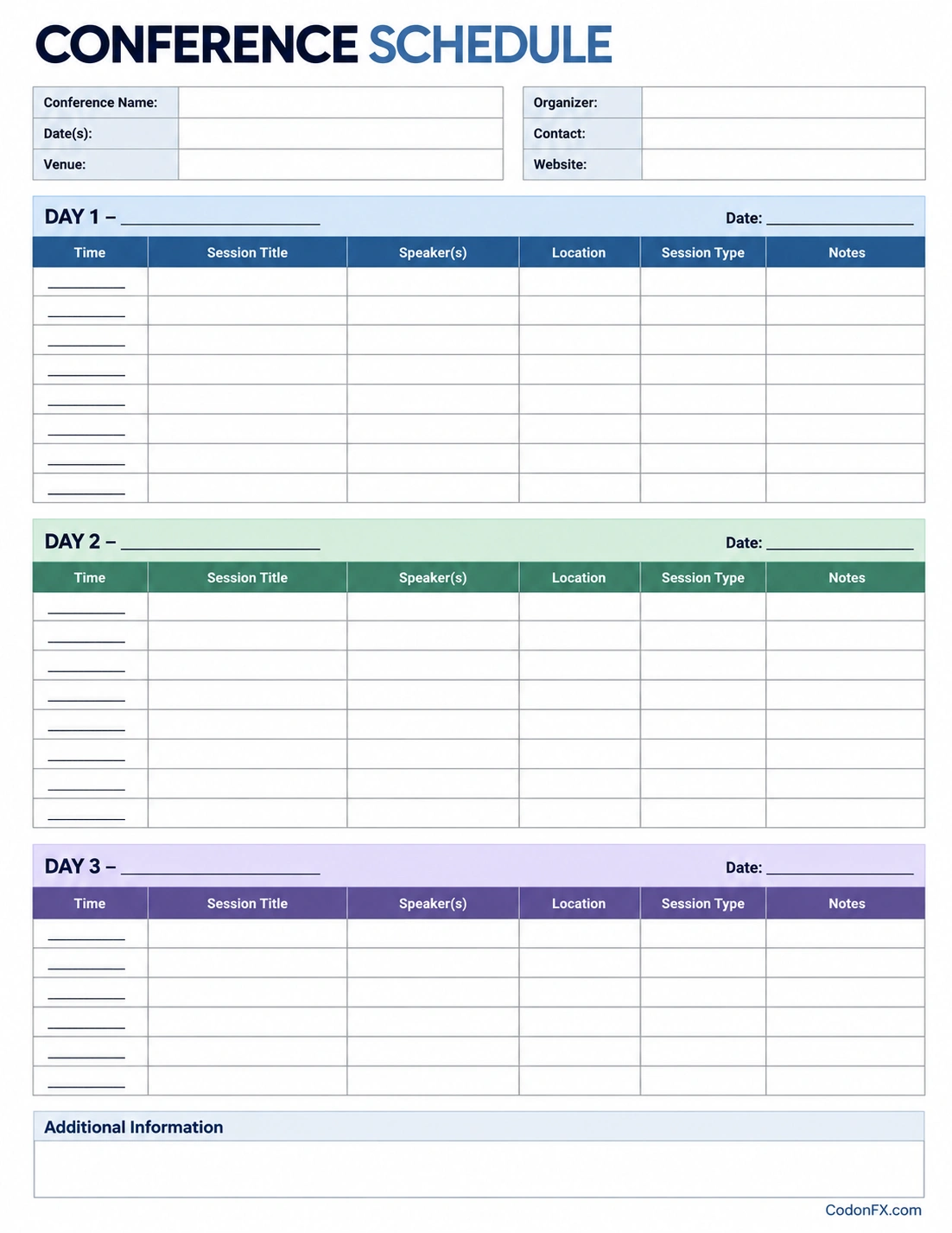
A printable conference schedule template makes it easier to plan and communicate an event without building a timetable from scratch. The template below provides space for conference details and a structured schedule for up to three days.
Use it to record session times, presentation titles, speakers, locations, session types, and additional notes. You can print a copy for planning meetings, distribute it to event staff, or use it as a working document while preparing the final attendee schedule.
Why Is a Conference Schedule Important?
A conference schedule does more than list times. It helps create a coordinated experience for attendees, speakers, volunteers, and event staff. A clear timetable also reduces confusion when several activities happen at the same time.
1. Helps Attendees Plan Their Day
Attendees often have different goals, interests, and professional priorities. A detailed schedule helps them identify relevant presentations, workshops, and networking opportunities before the event begins. They can also plan breaks and travel between session rooms.
2. Keeps the Event Organized
Organizers must coordinate speakers, room assignments, presentation equipment, catering, and staff availability. A shared timetable makes these responsibilities easier to manage and helps prevent overlapping activities or scheduling conflicts.
3. Improves Time Management
Allocating a specific time for every session encourages presenters and moderators to stay within their allotted periods. Planned breaks and transition times also help prevent small delays from affecting the entire conference.
4. Supports Networking and Engagement
Networking sessions, coffee breaks, meals, and informal discussions give participants opportunities to connect. Including these activities in the conference agenda ensures they receive appropriate time instead of being treated as afterthoughts.
5. Creates a Better Attendee Experience
When people know where to go and what to expect, they can focus on learning and connecting rather than searching for information. A readable schedule reduces uncertainty and makes the conference feel more professional.
What Should a Conference Schedule Include?
The right schedule format depends on the size, purpose, and duration of the event. However, most conference schedules benefit from including the following details.
- Conference name: The official name of the event.
- Date and duration: The dates covered by the schedule, including individual day labels for multi-day conferences.
- Venue and room locations: The main venue, room names, or breakout areas where sessions take place.
- Start and end times: Clear time slots for presentations, breaks, meals, and other activities.
- Session titles: Short, descriptive names that explain what each activity covers.
- Speaker or presenter names: The people leading a presentation, panel, or workshop.
- Session type: Labels such as keynote, workshop, panel discussion, Q&A, or networking.
- Breaks and meals: Scheduled time for refreshments, lunch, and informal conversations.
- Organizer contact details: An email address or other appropriate contact for schedule questions.
- Additional notes: Information about registration, room changes, accessibility, or special instructions.
For conferences with multiple tracks, consider adding a track name or color label so attendees can distinguish sessions that run simultaneously. For online events, include meeting links or access instructions in the appropriate version of the schedule.
How to Create a Conference Schedule
Planning a conference timetable is easier when you start with the event’s goals and build the schedule around its key activities. Follow these steps to create a practical and realistic plan.
Step 1: Define the Conference Goals
Decide what the event should accomplish. A professional conference may focus on industry insights and networking, while an academic conference may prioritize research presentations and discussions. The event’s goals will help determine the types of sessions and the amount of time each deserves.
Step 2: Confirm the Date, Venue, and Duration
Establish the event dates, opening and closing times, room availability, and any venue restrictions. Check whether rooms can accommodate the expected audience and whether setup or equipment checks must happen before sessions begin.
Step 3: List All Sessions and Activities
Collect confirmed presentations, keynote speeches, panel discussions, workshops, meals, breaks, registration periods, and closing activities. Record the expected duration and any special requirements for each item.
Step 4: Assign Time Slots
Arrange the activities in a logical order. Place important opening remarks and keynote sessions where they are likely to reach the intended audience. Allow enough time for presentations, audience questions, room transitions, and unexpected delays.
Step 5: Assign Speakers and Locations
Confirm speaker availability and match each session to an appropriate room. Check room capacity, presentation equipment, accessibility needs, and any technical requirements. For simultaneous sessions, make sure speakers and essential staff are not assigned to conflicting activities.
Step 6: Review the Schedule for Conflicts
Check the timetable for overlapping commitments, unrealistic transitions, missing breaks, and sessions that compete for the same audience. Ask relevant staff or speakers to review their assigned times before publishing the schedule.
Step 7: Publish and Share the Final Version
Prepare a readable schedule for attendees and a more detailed version for organizers if necessary. Share the schedule through the event website, email, printed handouts, or a conference app. Include a version date or update note so people can identify the latest information.
Tips for Building a Better Conference Agenda
A good timetable should be realistic, easy to scan, and flexible enough to handle minor changes. These practical tips can help improve your conference planning process.
- Keep sessions focused: Give each presentation enough time to deliver its main points without making the agenda unnecessarily long.
- Include transition time: Allow attendees to move between rooms and speakers to prepare their materials.
- Schedule regular breaks: Short breaks help participants recharge and provide opportunities for informal networking.
- Avoid unnecessary overlap: If possible, do not schedule sessions on closely related topics at the same time when they are intended for the same audience.
- Make the layout readable: Use clear headings, consistent time formats, and concise session titles.
- Prepare a contingency plan: Decide how to communicate room changes, speaker cancellations, or delayed sessions.
- Confirm details with speakers: Verify names, titles, presentation lengths, and technical needs before finalizing the timetable.
- Share updates promptly: If a session changes, communicate the revision through the channels attendees already use.
Conference Schedule Example
The following example shows how a one-day business conference might be organized. Adjust the times and activities to suit your audience, venue, and event objectives.
- 8:00 AM–9:00 AM: Registration and welcome refreshments.
- 9:00 AM–9:20 AM: Opening remarks and conference overview.
- 9:20 AM–10:15 AM: Keynote presentation.
- 10:15 AM–10:35 AM: Coffee and networking break.
- 10:35 AM–12:00 PM: Morning presentations or panel discussions.
- 12:00 PM–1:00 PM: Lunch and networking.
- 1:00 PM–2:30 PM: Workshops or breakout sessions.
- 2:30 PM–2:50 PM: Afternoon break.
- 2:50 PM–3:50 PM: Expert panel and audience Q&A.
- 3:50 PM–4:15 PM: Closing remarks and next steps.
This is a sample schedule rather than a fixed formula. A research conference may need longer presentation blocks, while a training event may devote more time to hands-on workshops. Review the intended audience and conference objectives before choosing the final format.
Common Conference Scheduling Mistakes to Avoid
Even a detailed schedule can cause problems if it ignores practical event requirements. Watch for these common mistakes when reviewing your timetable.
- Overloading the agenda: Too many sessions can leave attendees tired and reduce the value of individual presentations.
- Ignoring room transitions: Back-to-back sessions in different locations may leave insufficient time for attendees and speakers to move.
- Forgetting breaks: A schedule without adequate breaks can reduce attention and limit networking opportunities.
- Publishing unconfirmed details: Incorrect speaker names, times, or room assignments can undermine confidence in the event information.
- Failing to communicate changes: A revised internal schedule is not enough if attendees still have an outdated copy.
- Using a confusing layout: Inconsistent time formats, crowded text, or unclear room labels make the timetable harder to follow.
Frequently Asked Questions
What is the difference between a conference schedule and a conference agenda?
A conference schedule emphasizes the timing and location of activities, while a conference agenda often emphasizes the topics and order of discussion. In practice, the terms overlap, and many event documents combine both functions in a single timetable.
How do I make a conference schedule?
Start by defining the event goals, confirming the dates and venue, listing all sessions, assigning time slots and rooms, and checking for conflicts. Then publish a clear version for attendees and update it whenever confirmed details change.
What should a conference schedule include?
A conference schedule should include the event dates, session times, presentation titles, speaker names, locations, breaks, and relevant notes. Depending on the event, it may also include session types, conference tracks, registration details, and organizer contact information.
How far in advance should a conference schedule be prepared?
Begin planning as soon as the event dates, venue, and major activities are known. Share a preliminary agenda when useful, then publish the confirmed schedule once speakers, rooms, and session times have been verified. The ideal timeline depends on the event’s size and complexity.
Can I use a printable conference schedule template for a multi-day event?
Yes. A multi-day conference schedule template can organize activities by day and provide consistent fields for times, sessions, speakers, and locations. For larger events with many simultaneous tracks, a spreadsheet or event management platform may be easier to maintain alongside the printable version.
How can I manage last-minute conference schedule changes?
Assign someone to approve and communicate changes, keep a current master schedule, and use consistent communication channels such as email, event announcements, or a conference app. Clearly identify the affected session, its new time or location, and the date of the update.
Conclusion
A well-planned conference schedule helps attendees navigate sessions, gives organizers a practical framework for coordinating resources, and supports a smoother event experience. By including clear times, session titles, speaker details, locations, and breaks, you can make the conference easier to manage and more valuable for participants.
Use the free printable conference schedule template from CodonFX.com to organize your event details and build a timetable that fits your conference goals. Review the schedule carefully, confirm important details with speakers and staff, and communicate updates promptly to keep everyone informed.
Download: Conference Schedule Template
